Reading Enphase Enlighten Without Guessing
Four screens tell you almost everything about your array. What Enlighten measures, why it never matches the utility bill, and how to judge a New York year rather than a bad week.
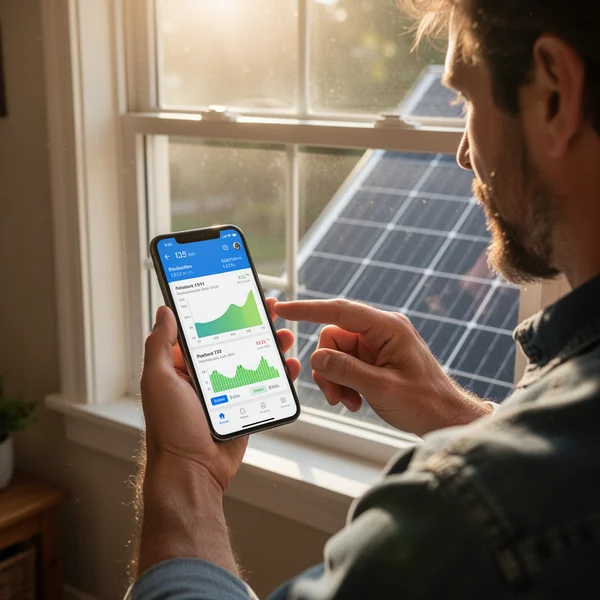
Enphase Enlighten shows you the AC energy each microinverter actually delivered, which means a New York homeowner can identify a single bad panel from the kitchen table — and also means the app will never match the DC nameplate on your roof, will never know your electricity rate, and will never show you what Con Edison or National Grid credited you. This monitoring guide is about telling those three things apart, because almost every “my solar is broken” call turns out to be one of them misread.
Learn four screens and you will be able to answer most questions about your own array without phoning the installer.
What Enphase Enlighten monitoring is actually measuring
Each panel on your roof has its own microinverter underneath it. That microinverter converts DC to AC at the panel and reports its own production over the building’s AC wiring back to the IQ Gateway — the small box near your panel, called an Envoy on older systems. The Gateway uploads to Enphase, and Enlighten and the Enphase App display it.
Three consequences follow, and they explain most confusion:
- You are looking at AC, not DC. Conversion losses happen before the measurement, so a system of a given DC size will always report a lower peak than that number. This is normal and not a fault.
- Communication and production are separate. A microinverter can be making power perfectly while failing to report it. “Not reporting” is a comms symptom, not a production symptom.
- Consumption data is optional. If your installer fitted current transformers around the service conductors, you get household consumption and a net view. If they did not, you get production only — and no amount of clicking will conjure the rest.
The four screens worth knowing
1. The energy graph
Switch between day, month, year and lifetime. The day view is where diagnosis happens. On a clear New York day the curve should be a smooth arc, peaking around solar noon and skewed by whichever direction your roof faces. Read the shape, not the total:
- A clean arc with a notch out of the morning or late afternoon is shading — a chimney, a neighbour’s maple, a parapet. Predictable, seasonal, and it deepens as the sun drops in November.
- A flat top is not a problem. It is the microinverters clipping, which happens when the panel out-produces the microinverter’s AC rating on a bright cold day. Cold, clear February days in the Hudson Valley produce more clipping than muggy August ones.
- A ragged, spiky day is cloud. New York summers deliver a lot of these.
- A day at zero across the whole array in January is almost always snow, not failure. Our page on snow on solar panels in New York covers when to leave it and when it matters.
2. The array view
This is the layout of your roof with each panel shown and colour-coded by production. It is the single most useful screen Enphase gives a homeowner, because a problem that a whole-system total hides is obvious here.
- One panel darker than its neighbours, every day, at the same time of day: shading or soiling.
- One panel darker than its neighbours all day, every day: suspect the module, the connector, or something living under it. Squirrels chewing conductors under arrays is a genuine and common upstate problem — see squirrels under solar panels.
- A contiguous block dark together: usually a branch circuit or a comms issue, not eight simultaneous failures.
- Everything dark: check the Gateway, not the roof.
3. Devices and system status
The devices list shows each microinverter, the Gateway, and any battery or combiner. Two states get confused constantly:
| What you see | What it usually means | What to do |
|---|---|---|
| Microinverter not reporting | Powerline communication to the Gateway is weak or interrupted | Check whether energy still appears later once it catches up; a lot of these self-resolve |
| System not reporting / gateway offline | Your internet or the Gateway’s connection dropped | Production continues; the data backfills when it reconnects |
| Microinverter reporting zero while neighbours produce | A real hardware or connection fault | Screenshot the array view across several clear days and open a ticket |
| Whole array zero, grid outage | Grid-tied inverters shut down by design during an outage | Nothing. This is anti-islanding and it is required |
That last row surprises people every time a Nor’easter takes out the neighbourhood. Without a battery and the right hardware, a grid-tied system does not power your house during a blackout, and the app going quiet is the system behaving correctly.
4. The consumption view
If your system has consumption CTs, you get produced, consumed, imported and exported. Two cautions. First, a CT clamp installed backwards flips the sign, and the symptom is a house that appears to export at midnight — if you have ever wondered why your numbers look impossible, that is the first thing to check with your installer. Second, this view is a physical energy measurement, not a financial one.
Why Enlighten’s numbers will never match your utility bill
This is the most common misunderstanding, and it is not a defect. Enphase measures energy at your house. Your utility measures energy at the revenue meter and then applies a tariff — supply, delivery, demand-related and customer charges, and net metering credit rules that differ across Con Edison, National Grid, NYSEG, RG&E, Central Hudson, Orange & Rockland and PSEG Long Island.
Enlighten does not know your rate, does not know your billing period boundaries, and does not know how your credits roll. Comparing the kilowatt-hours is fine; comparing dollars is not, because the app is not calculating any. If you want to understand what actually landed on the bill, start with how net metering credits work in New York, and Con Edison customers should read a Con Edison bill after solar alongside their app.
Judging a New York year rather than a New York week
Your installer’s production estimate was an annual figure derived from modelling, and it assumed losses you will experience unevenly. In New York that unevenness is severe: a Buffalo array under lake-effect cloud in December and a Long Island array in June are not comparable months even on the same system.
So judge in the right units. Compare the same month year over year once you have two years. Compare a clear-sky day this June against a clear-sky day last June. Do not compare a snowy January against the annual average divided by twelve and conclude something is wrong — that comparison will always fail, in every year, on every working system in this state.
Set Enlighten’s monthly summary email on, and once a year open the lifetime view and check the trend line rather than any single point. Panel output does decline slowly by design; that is what the manufacturer’s performance warranty covers, and it is a gentle slope, not a step.
One money note, because it changed
If reading your monitoring has you considering expanding the array, price it against the current rules rather than the ones you installed under. The federal residential clean energy credit under Section 25D ended for expenditures after 31 December 2025, so a New York household adding panels in 2026 gets nothing federal. What remains at state level is real: Form IT-255 gives 25% of system cost capped at $5,000, applies to purchased and leased systems, is claimed for the tax year you receive Permission to Operate, and carries forward up to five years.
What to do next
- Open the array view on the next clear day around noon and screenshot it. That is your baseline for every future comparison.
- Confirm whether your system has consumption CTs. If the app shows only production, ask the installer what it would take to add them.
- Turn on the monthly summary email so a declining month reaches you without you looking.
- Note your Permission to Operate date. It is the date that governs your IT-255 claim year, and it is not the install date — the gap is covered in our page on the wait between install day and switch-on.
- Before calling anyone about an underperforming panel, collect three clear days of array-view screenshots. A ticket with evidence gets a truck roll; a ticket without one gets a reset.
NY Solar Incentives
Independent New York solar research. We summarise NYSERDA, NY-Sun and federal programme rules from published sources and state plainly when a figure is an estimate. We are not a government agency and do not sell equipment.
Run the arithmetic on your own system
Check the dated program table and your arrangement before counting an incentive. Standard residential NY-Sun blocks are closed; Long Island Affordable Solar has a conditional income-verification route. The NY credit depends on qualified costs and tax liability, while the NYC abatement reduces future property-tax bills. The estimator keeps those timings separate.