Reading Your SolarEdge Monitoring App Like an Owner
What the SolarEdge app actually measures, which screens are missing without a meter, how to read a fault from New York seasonality, and why the app never matches your utility bill.
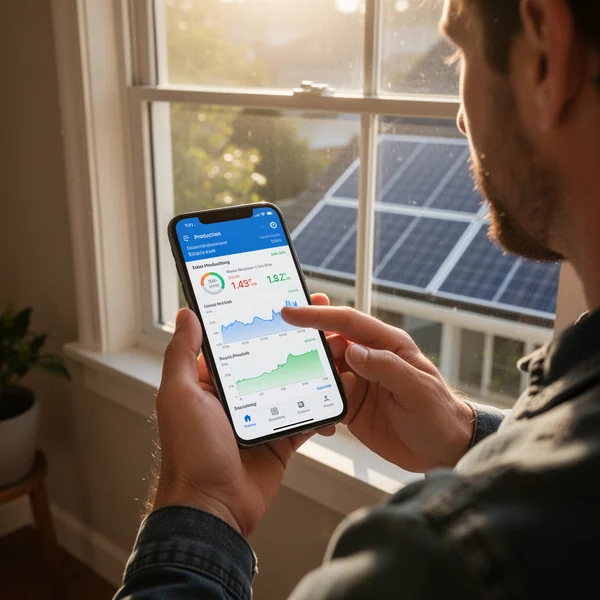
Your SolarEdge monitoring app reports what the inverter measured at the inverter — not what your utility meter recorded, and not what you were billed. Those numbers will never match exactly, and a New York owner who understands why stops worrying about the gap and starts using the app for what it is genuinely good at: catching a dead optimizer, a snow-covered array, or an inverter that quietly went offline three weeks ago.
This is the owner’s reading of the app, not the installer’s. It covers what each figure actually measures, which screens are missing if a meter was never installed, how to tell a real fault from normal New York seasonality, and the account housekeeping most homeowners never do until they need it.
First: make sure the account is actually yours
SolarEdge runs two front ends. The mySolarEdge mobile app is the homeowner view. The Monitoring Platform in a web browser shows considerably more, including the physical layout of your roof and per-module history, and it is worth logging into on a laptop at least once.
Before anything else, confirm you are recorded as the system owner rather than a guest attached to the installer’s account. Installers come and go — New York has had plenty of solar companies close, merge or leave the state — and an owner who is only a guest on a defunct company’s portal loses visibility at the worst moment. If you cannot change settings, or your name is not on the account, contact SolarEdge support with your proof of purchase and ask for ownership to be transferred. Do it while the paperwork is still easy to find.
While you are in there, switch on email alerts for production loss and communication faults. The most common monitoring failure is not a dramatic one; it is silence, for weeks, because nobody happened to open the app.
What each number on the SolarEdge monitoring app really measures
- Production — AC energy measured at the inverter output. This is real and reliable, and it is the figure to trend over time.
- Consumption, self-consumption, import and export — these require a separate energy meter installed with current transformers at your main service. If that meter was never fitted, those tiles are absent or derived rather than measured. Many New York systems were installed without one. If yours has no meter, treat any consumption figure with suspicion and use your utility bill for that side of the story.
- Module-level power — reported by the power optimizer on each panel. This is the diagnostic gold in the system and the reason SolarEdge equipment is specified in the first place.
- Layout view — the roof map with each panel in its real position. It only exists if the installer built it. If you see a plain list of serial numbers instead of a picture of your roof, ask the installer to complete the physical layout. Without it, a panel reading zero tells you a panel is down but not which one.
Reading the shapes, not just the totals
A day’s production curve tells you more than a monthly figure:
- A flat-topped plateau on a bright summer day is usually clipping — the array’s DC capacity exceeding the inverter’s AC rating at midday. If the system was designed that way it is normal and not a fault.
- A notch in the curve at the same time each day is shading. A chimney, a vent stack, or a neighbour’s maple that has grown since the site survey. With module-level data you can see exactly which panels dip and when.
- One module at zero while its neighbours are fine points to a failed optimizer or a connection problem, not a bad panel — and it is a warranty conversation.
- A whole string at zero is a DC-side issue: a tripped DC disconnect, a blown fuse, or a wiring fault. Do not open anything; call the installer.
- Everything at zero, with a communication alert is very often not a solar problem at all. See below.
No data does not mean no production
The system reports over your home internet — Ethernet, Wi-Fi or a cellular module. Change your router, rename the network, or update the Wi-Fi password, and the monitoring stops while the array keeps producing perfectly well. Before you panic, check whether the inverter’s screen or the app is reporting a communication fault rather than a production fault, and check whether your utility meter is still spinning backwards during the day. Reconnecting the gateway to a new network is usually a homeowner-level task; SolarEdge publishes the procedure for each communication option.
New York seasonality, and why January looks alarming
New York production has a very pronounced seasonal shape. Short days, a low sun angle and heavy cloud through the winter mean January output is a fraction of July’s in every part of the state, from Suffolk County to Chautauqua. That is expected, not a defect. Always compare like months year over year — this January against last January — never against the summer.
Snow is the other big one. An array under snow produces nothing, and in Buffalo, Syracuse, Watertown or the Southern Tier it can stay covered for days. The app will show a run of near-zero days and then a sharp recovery as the panels shed. What you should and should not do about it — particularly the “should not”, which involves anyone climbing on a roof with a broom — is covered in Snow on Solar Panels in New York: What to Do.
Two more New York effects worth knowing: coastal salt deposition on Long Island and soot in dense parts of the city can build a film that shows as a gradual, uniform production decline across every module rather than a step change — the pattern to look for is all panels down slightly, not one panel down completely. And a spring pollen layer produces a short, self-correcting dip after the first heavy rain.
Why the app and the utility bill disagree
They measure different things at different places over different periods. Specifically:
- The inverter measures at the inverter. The utility meter measures at the service point, after wiring losses, and it only ever sees the net flow — what your house did not consume on the spot.
- Your billing period does not begin on the first of the month. The app’s calendar months do.
- Under net metering, what appears on the bill is a credit balance, which is an accounting construct layered on top of the meter reading. How that banking works, and why it is not simply “production minus usage”, is set out in Net Metering in New York: How Credits Work, and the line-by-line version for city customers is in Reading a Con Edison Bill After Solar.
- If your system predates Permission to Operate, or was commissioned in a partial state, early data can be misleading. The waiting period itself is explained in Permission to Operate: The Wait Between Install Day and Switch-On.
Using the data when something is wrong
Monitoring history is evidence. If production falls short of what was modelled at sale, or a component fails, the exported data is what supports a workmanship or performance claim — so export it periodically rather than relying on the portal retaining it forever. Read the actual warranty documents for your inverter and optimizers rather than a figure someone quoted you; the terms, the registration requirements and what counts as covered are in the manufacturer’s published warranty for your specific model.
One tax note
For New York owners, the state credit on Form IT-255 — 25% of system cost capped at $5,000, carried forward up to five years — is claimed for the tax year the system receives Permission to Operate from the utility, not the year of install day. The monitoring app can help you reconstruct when the system genuinely began operating, but the utility’s PTO letter is the document that governs. Note also that both federal residential energy credits closed to property placed in service after 31 December 2025, so a 2026 system gets nothing federal — the state credit is what remains.
What to do next
- Log in on a desktop browser, confirm you are the account owner, and request a transfer from SolarEdge support if you are not.
- Turn on production-loss and communication alerts by email, then leave them on.
- If your portal shows a list of serial numbers instead of a roof layout, ask your installer to build the physical layout.
- Check whether a consumption meter was actually installed; if not, stop treating any consumption figure as measured.
- Set a monthly habit: open the app, compare this month with the same month last year, and scan the module-level view for any single panel out of line with its neighbours.
- Export a copy of your production history once a year and keep it with your PTO letter and warranty documents.
NY Solar Incentives
Independent New York solar research. We summarise NYSERDA, NY-Sun and federal programme rules from published sources and state plainly when a figure is an estimate. We are not a government agency and do not sell equipment.
Run the arithmetic on your own system
Check the dated program table and your arrangement before counting an incentive. Standard residential NY-Sun blocks are closed; Long Island Affordable Solar has a conditional income-verification route. The NY credit depends on qualified costs and tax liability, while the NYC abatement reduces future property-tax bills. The estimator keeps those timings separate.